Live & interactive - it plays on its own; click anything to take over, or open the full demo →
Notion works great internally… until clients are involved
You've built the perfect system in Notion - project trackers, meeting notes, file libraries, internal comments.
But when it's time to share with clients, you hit a wall:
Public links feel too exposed
Anyone with the URL can view everything. No login, no control.
Filtered views aren't actually secure
Clients can change filters and suddenly see data from other projects or clients. Notion has no row-level security.
You can't let them collaborate safely
Without risking they'll stumble into content meant for internal eyes only.
Notion wasn't built for this. You need something between "share the whole page" and "build a custom client portal from scratch."
A permission layer on top of Notion
Portalize connects to your existing Notion databases and creates isolated, secure portals for each client.
Clients log in with their own credentials
No more public links. Each client has a unique account tied to their identity.
You define client-safe views
Create views from any Notion database. Choose which fields are visible and how data is scoped to each client.
Data is scoped server-side
Clients never query your Notion databases directly. Data is filtered and scoped before they see it.
Safe by default
Free portals are read-only by design. Paid plans can unlock specific editable fields — clients still only see rows scoped to them.
What doesn't change:
Portalize sits on top. Notion stays your source of truth.
Get Started in Minutes
No complex setup. No technical knowledge required.
Connect Your Notion
Link the database you want to share (projects, files, invoices, etc.). Portalize reads the structure - you stay in control.
Create Client-Safe Views
Pick which fields are visible. Define how rows are scoped to each client (by name, email, or custom property).
Invite Your Clients
They get login credentials and access their portal. No Notion account required. No risk of seeing other clients' data.
How this is different from what you've already tried
| What you've tried | The problem | How Portalize solves it |
|---|---|---|
| Public Notion links | Anyone with the link can view. No login, no privacy. | Every client logs in. Access is tied to their identity. |
| Notion Guest accounts | Clients can navigate to other pages, see edit history, access underlying databases. | Clients never touch your Notion workspace. They access a controlled view. |
| Duplicate workspaces per client | Data scattered everywhere. Maintenance nightmare. | One Notion workspace. Data is scoped server-side per client. |
| Super / Notion-to-website tools | Makes things look nice, but doesn't solve permissions or multi-client access. | Built specifically for multi-client access with server-side data scoping. |
| Building a custom portal | Weeks of dev work. Syncing issues. Ongoing maintenance. | Connect in minutes. Syncs automatically. We handle the infrastructure. |
Everything Your Agency Needs
A complete client portal solution built for agencies who use Notion
Notion Sync Within Minutes
Updates from your Notion workspace appear in the portal within minutes — no manual republishing.
Custom Branding
Colors and portal name on Free; custom logo & favicon on Starter+; custom domain on Agency.
Passwordless Authentication
Secure, passwordless login for your clients. No passwords to remember or reset.
Automated Notifications
On Starter and above, notify clients when new projects, tasks, or documents are added.
Multi-Client Management
Manage clients from one dashboard — Free covers 3, Starter 10, Professional 50, Agency unlimited.
Server-Side Data Isolation
Each client only sees rows scoped to them. Filtering happens on the server — not a Notion view they can change. How we handle security →
Your clients see the actual work
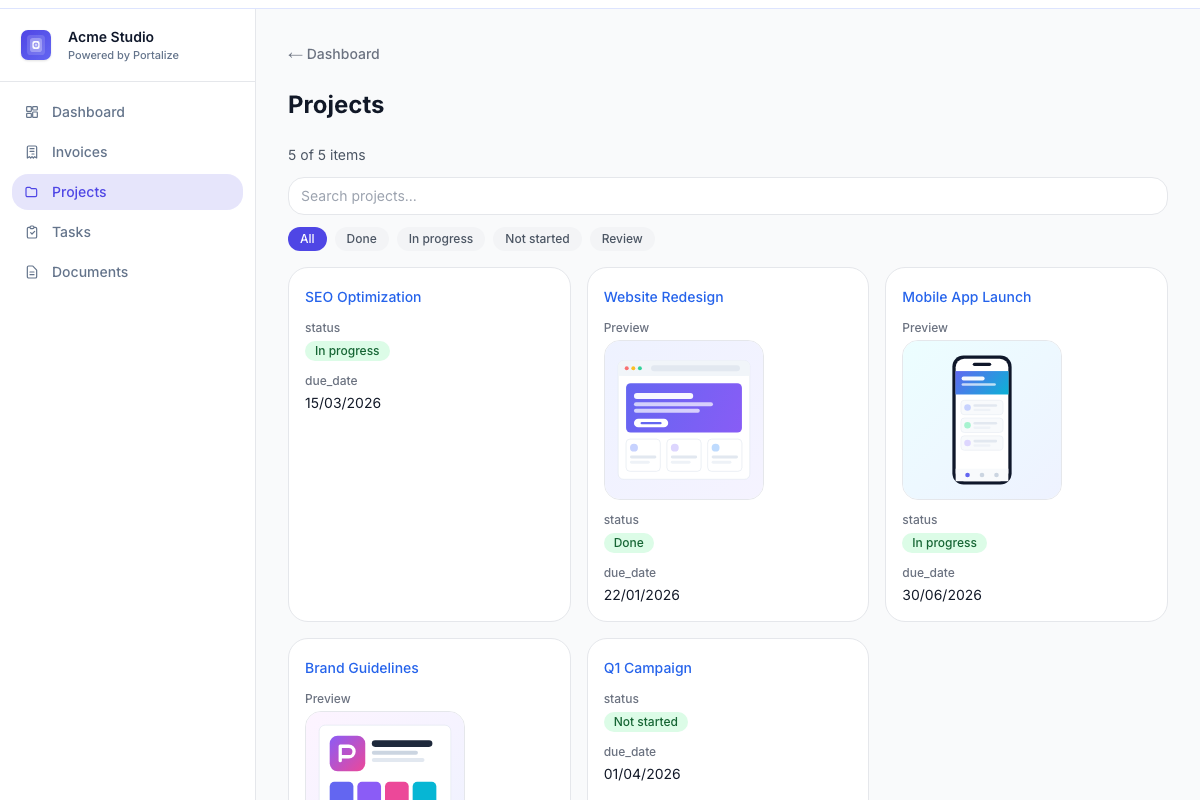
Mockups, deliverables, screenshots, product photos - the images in your Notion databases show up right inside each client's portal. No re-uploading, no separate gallery, no Notion access for clients.
- Pulls images straight from your Notion “Files & media” columns
- Choose a thumbnail size per view - detail pages always go large
- Works across list, table, and card layouts
Start free. Scale when you’re ready.
Run a real client portal at $0 — no credit card, no timed trial. Upgrade anytime for more clients and power features.
Pay for 10 months, get 12. Prices shown are per month.
Free
Forever free — run a real client portal
- 1 portal
- Up to 3 clients
- Notion-powered client portal
- Client-safe read-only views
- Passwordless authentication
- Reusable login links with custom validity
- Colors and portal name
- Client preview mode
Starter
$190 billed annually
For solo consultants testing Portalize
- Everything in Free
- Up to 10 clients
- Custom logo & favicon
- Client-editable fields
- Email notifications
- Email support
Professional
$390 billed annually
Best for most agencies
- Everything in Starter
- Up to 50 clients
- 3 portals included
- Remove "Powered by Portalize"
Agency
$790 billed annually
For high-volume agencies
- Everything in Professional
- Unlimited clients & portals
- Custom domain support
- Audit log (client last seen)
- Priority support
Cancel anytime — your portal stays on Free forever within Free limits. Notion guests still cost per seat and can wander; Portalize scopes data server-side.
Need custom setup or SSO?
Agency already includes unlimited clients & portals. Contact us for SSO, SLA, and dedicated support.
Free forever • No credit card • Upgrade anytime
Frequently Asked Questions
Is there a free plan?
Yes — Free forever. You get 1 portal and up to 3 clients with branding basics, client preview, and passwordless login. No credit card and no timed trial. Upgrade anytime for more clients, editable fields, email notifications, and custom logo.
Do clients need a Notion account?
No. They log into Portalize directly using passwordless authentication.
Does this change my Notion workspace?
No. Portalize reads your data but doesn't modify your workspace structure.
Can I control what clients see?
Yes. Portalize uses client-safe views that define which fields and rows are visible. Each client only sees data scoped to their identity.
What if I update something in Notion?
Changes sync automatically to the relevant client portals within minutes.
Is this secure?
Yes. Data is scoped server-side before clients see it. Clients never query your Notion databases directly - they see only what you've defined in their views.
Is the portal read-only?
On Free, client views are read-only. Paid plans can enable client-editable fields so clients update selected Notion properties from the portal.
How is this different from sharing a public Notion page?
Public pages have no authentication and anyone with the link can view them. Portalize requires each client to log in and only shows them data scoped to their identity.
Why not just use Notion's Guest feature?
Notion Guests can still navigate to parent pages, see underlying databases, and potentially access other clients' information. Portalize creates a controlled environment where clients see only their scoped views.
How do I scope data to each client?
When creating a view, you define which field identifies the client (typically a 'Client Name' or 'Email' property). Portalize automatically filters rows to show each client only their data.
Free forever — no credit card
Launch your first client portal today
Connect Notion, invite up to 3 clients, and go live at $0. Upgrade only when you outgrow Free.
Free forever • 1 portal • Up to 3 clients • Upgrade anytime
Signing in to Portalize
Agencies create a Portalize account with an email and password, or with Sign in with Google. When you use Sign in with Google, Portalize receives only your Google account name, email address, and profile photo, and uses them solely to create and authenticate your Portalize agency account. Portalize does not request access to Gmail, Google Drive, Contacts, or any other Google service, and never sells your data. See our Privacy Policy for details.
Looking for client portal login?
Visit your agency's portal URL (provided by your account manager)